The Independent Insight

Giving truth a voice

  • Email
  • Facebook
  • Flickr
  • Instagram
  • Phone
  • Twitter
  • Vimeo
  • YouTube
  • Berita
  • Politik
  • Ekonomi
  • Teknologi
  • Reviu
    • Reviu Buku
    • Reviu Filem
    • Reviu Muzik
  • Rencana
  • Podcast
  • Tentang Kami
  • Hubungi Kami

Debt Repayment Plan : Stacking Or Snowball?

August 29, 2017 By Jefryzal Talib Leave a Comment

Did you know – total of 22,581 bankruptcy cases recorded by the Insolvency Department (MdI) between 2012 and September 2016 involved individuals aged between 25 and 34. – source : NST, November 2016

Most of the reported cases are due to failure to settle hire and purchase loans, followed by personal loans and housing loans. Honestly, I am unaware of this housing loans. I am keen to find out more on this matter and maybe will write about it in future post.

When you decide to take up loan from the bank, you should aware of your commitment before you sign the papers. I do find some people who didn’t even know the interest amount of their loans. That is just wrong..and sad.

In this post, we will discuss on how to tackling debts efficiently with 2 simple methods that widely used and recommended by many financial expert.

Let’s take an example : Ali has several loans in his list ;

  1. Credit Card – 15% p.a interest (total debt – RM 5,000)
  2. Personal loan – 12.46% p.a interest (total debt – RM 15,000)
  3. Hire Purchase – 3.01% p.a interest (total debt – RM 50,000)
  4. Education loan – 1% p.a interest (total debt – RM 3,000)
  5. Home loan – 4.55% p.a interest (total debt – RM 250,000)


Debt Stacking Method

This method is focusing on tackling the highest interest rate. By using this method, Ali’s debt repayment plan should looks like this :
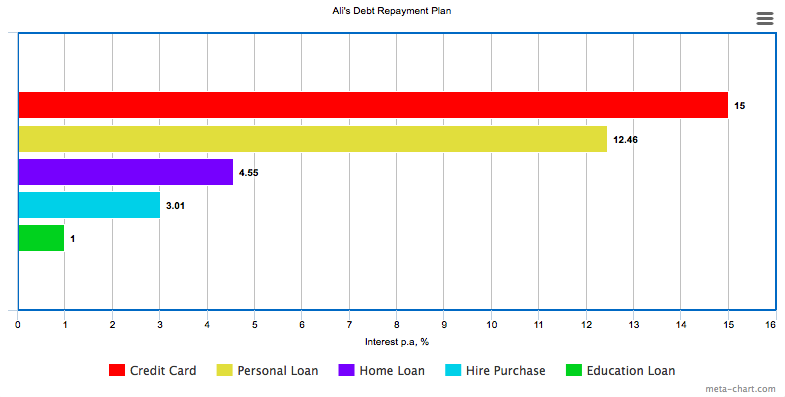
With this method, Ali should pay the minimum amount on all his loans, and use the extra available cash to pay the debt with highest interest rate, which in this case is credit card. Let say – Ali can allocate RM 2,500 monthly for his debt repayment but the total minimum amount that he needs to pay is just RM 2,200. The balance RM 300 is considered as the extra available cash and this money should go to credit card’s payment.

Bear in mind –  this method is suitable for people who wants to save more money in interest payment and it takes longer time before you can cross the debt from you list, depending on the loan amount. You need to have the patience and importantly ; don’t get demotivated.


Debt Snowball Method

Snowball method is focusing on lowest amount debt. This method is recommended by financial expert Dave Ramsey. Let’s see how this method can be applied to Ali’s debt list.
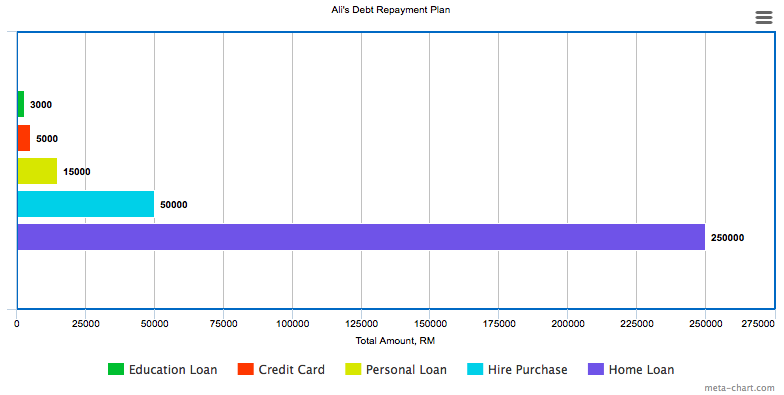
From the chart, the lowest debt would be the education loan which is only RM 3,000. Same as the stacking example, Ali will pay minimum on other loans and loop in the extra cash to pay his education loan. Soon when the debt paid off, it will give Ali more cash allocation which he can use to “attack” the second lowest debt which is the credit card,  and at the same time giving him motivation to settle other debts.

Personally, I prefer this snowball method. During my wedding preparation 2 years ago, I swiped my credit card here and there – telling myself that I can pay it all right after the wedding. I was wrong. It took me exactly 8 months to kill that devil credit card. To cross it off my debt list, I felt like a champ! ? (Rocky Balboa’s theme song plays in the background)

I know it’s hard for some people to get out of this debt’s chain. If you feel like you are at the dead end and feel like giving up, don’t be. You can still try to contact Malaysia Department of Insolvency to discuss your situation. Hopefully they will show you a way out.

You have any other efficient way to manage the debt? I would love to hear it in the comment.

Jefryzal Talib
Jefryzal Talib

Filed Under: Ekonomi Tagged With: Debt, Snowball, Stacking

How To Start Your Monthly Expenses Plan

August 25, 2017 By Jefryzal Talib 1 Comment

In this post, I want to share a very basic tips on how to manage your monthly expenses. I start to manage my monthly expenses in 2013 when I landed my first job as a technical executive in a shipbuilding company. I was technically a graduate engineer at that time so the pay wasn’t so good and to have a bad spending habit (mostly on video games) just make it worst ?. Lesson learnt *finger crossed*

Then slowly I realized that I need to keep track every penny of my hard earned money so I start keeping every receipts in my wallet – hoping that I will store it nicely in a file like a stereotype successful businessman. Unfortunately that wasn’t the case because I am too lazy and all the receipts are just so confusing.

It took me sometime before I start to use the spreadsheet to record my monthly expenses, which I still practice up until now. So what I did is, I create a custom template of my spending pattern and record my total income of the month. The spreadsheet will auto calculate my total expenses, my saving and my free cash. Bear in mind, your spending pattern is not always the same. Imagine if you have holiday plan that month, you can always allocate more money on your travel budget.

Before you start structuring your expenses plan, you need to know what type of expenses you have so you won’t mixed them up. Basically there are 2 type of expenses :

  • Fixed Expenses
    Fix amount of money you need to spend no matter what. Eg : home rental, bank loans (car, personal, credit card).
  • Flexible Expenses
    The expenses that you can adjust depending on your needs. Eg : mobile plans, internet, tv.

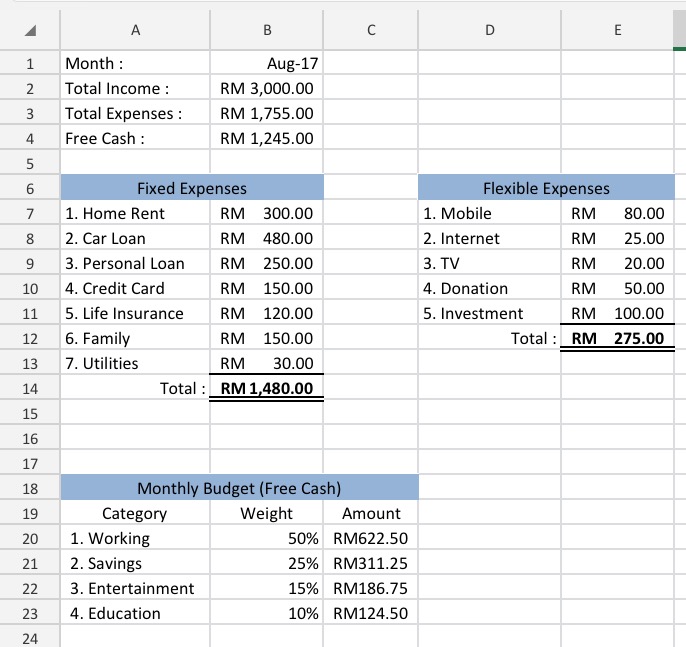
For example, Ali’s monthly income is RM 3000. He is single and currently renting a house with his friends. Below is the example of Ali’s expenses plan :


Every month, Ali need to allocate RM 1480 for his fixed expenses. This amount is unavoidable and might be increasing once Ali have more commitment. He also need to spend RM 275 for his flexible expenses. This type of expenses can be adjusted once in a while depending on the financial health and lifestyle. For example – 1 year ago, I used to subscribe RM 80 mobile plan from Maxis. Then I decided to change it to RM 38 plan from Celcom as the plan suit my lifestyle, plus I saved more than half over the year. Until recently I changed my plan back to Maxis as I need more internet data for my heavy usage and importantly the package falls within my budget.

Ali’s total expenses for August 2017 is RM 1755, giving him RM 1245 free cash. This is when Ali start to break down the amount into 4 categories. Each category comes with a weightage which can be adjusted depending on Ali’s plan for that month. Let say on the next month, Ali plans to have a little weekend getaway. He can allocate more budget on entertainment to support his travel expenses, and reduce his other budgets.

This is the first step you can try to start tracking your monthly expenses. Save your spreadsheets in clouds or dropbox for convenient editing. You can record your micro expenses using financial apps through your smartphone. I make a list of financial apps that you can download on your phone here Apps For Financial Planning.

How’s your monthly budget so far? Share your thoughts in the comment ?


Jefryzal Talib
Jefryzal Talib

Filed Under: Ekonomi

Apps For Financial Planning

August 23, 2017 By Jefryzal Talib Leave a Comment

When I decided to start tracking my expenses more seriously couple years back, I always ended up wondering where my money goes to at the end of the month. I used to called the missing money as “the black spot”. During that time everything was limited and the apps store was not as fancy as today. Thanks to the technology, now we can see various mobile applications that are really useful in managing our day to day expenses. Here are the top 5 financial applications that I used over the years.


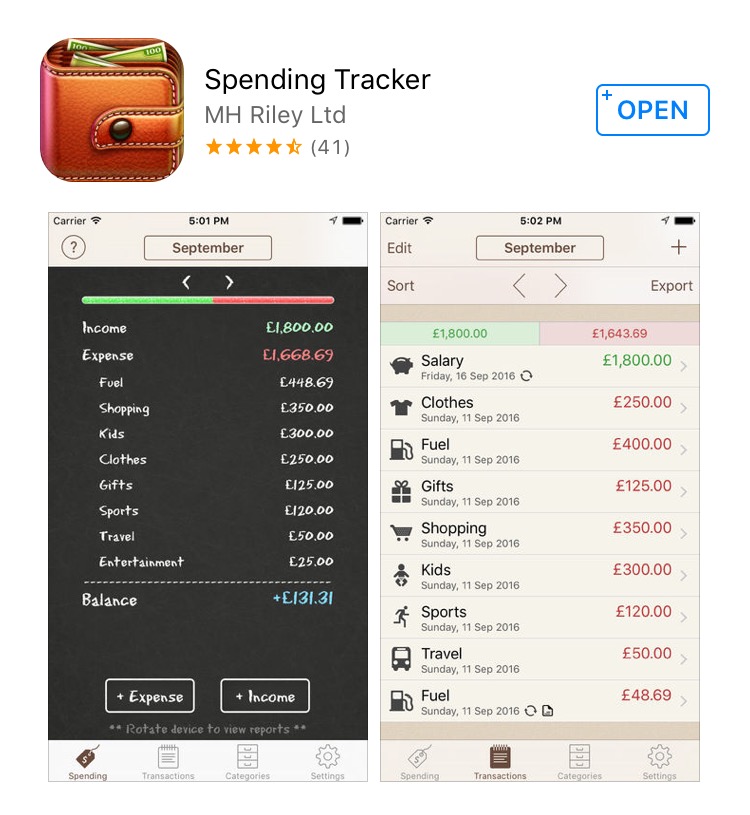
1. Spending Tracker

Platform : ios / Android
Price : Free with ads / RM 12.90 Premium
Pros : You can set your weekly or monthly budget, depending your spending pattern. I used to use this app to track my daily micro expenses. You can upgrade your account to premium to get more function such as repeating transactions, auto syncing, export to CSV & PDF and of course, ads free.
Cons : You can’t keep track your savings and debt. No inter device syncing


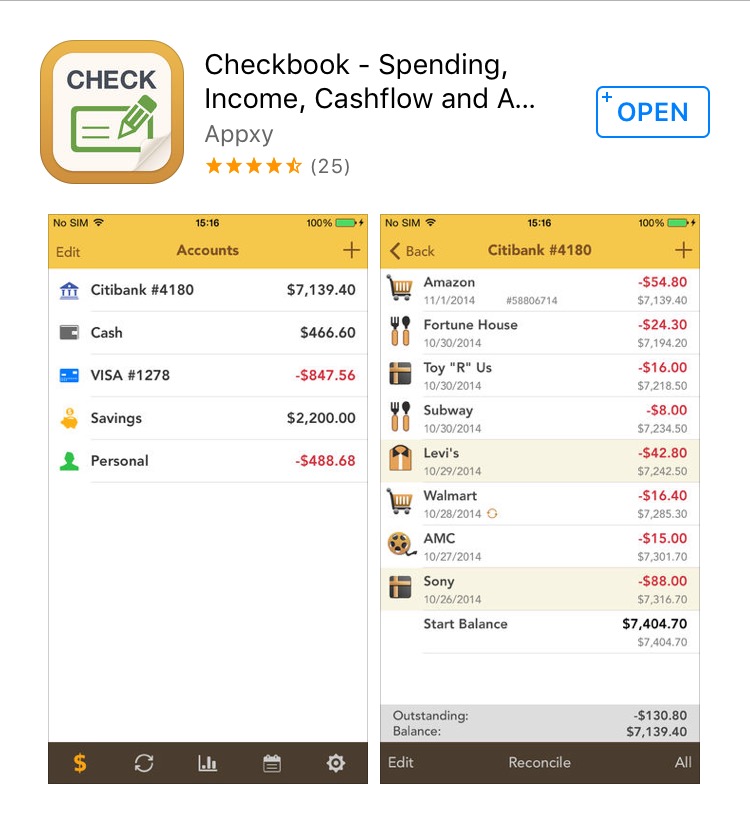
2. Checkbook

Platform : ios / Android
Price : Free with ads / RM 12.90 Premium
Pros : With this app you can see your current account, your remaining debt, and your total savings in one page. This app helps me to know my financial health, so I could make a “rough” budget plan. You also can export the data in CSV, HTML and QIF.
Cons : No inter device syncing, unattractive layout


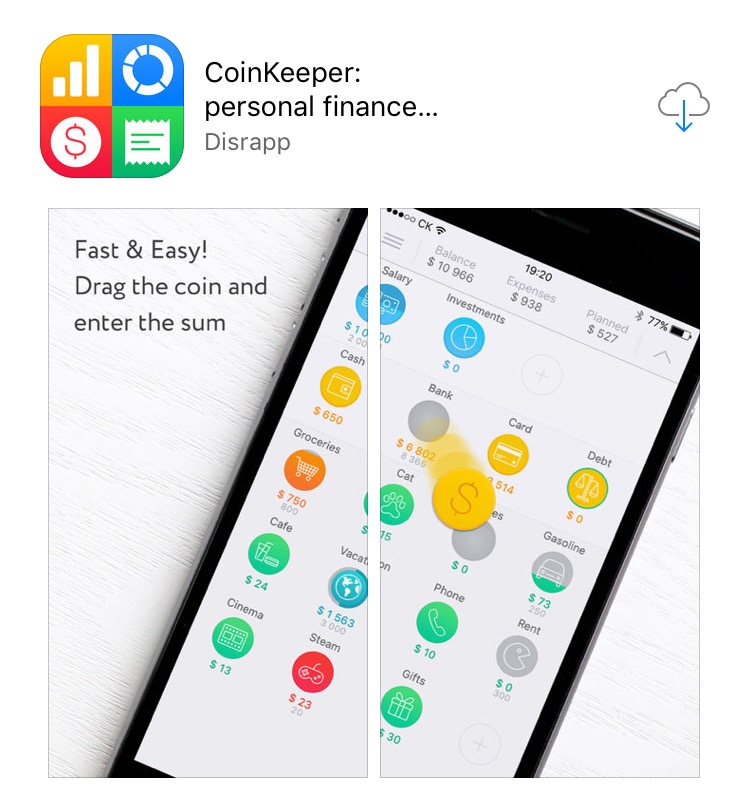
3. CoinKeeper

Platform : ios / Android
Price : Free with ads / $3.99 Monthly Premium
Pros : The layout is absolutely stunning. You can just drag the coin shape for any category to record your expenses or transferring money between multiple bank accounts.I can say that this app is very user friendly. Addition to that, you can view a chart of your expenditure which is a cool feature in case you are a chart lover.
Cons : 4 dollar a month is quite expensive for me.


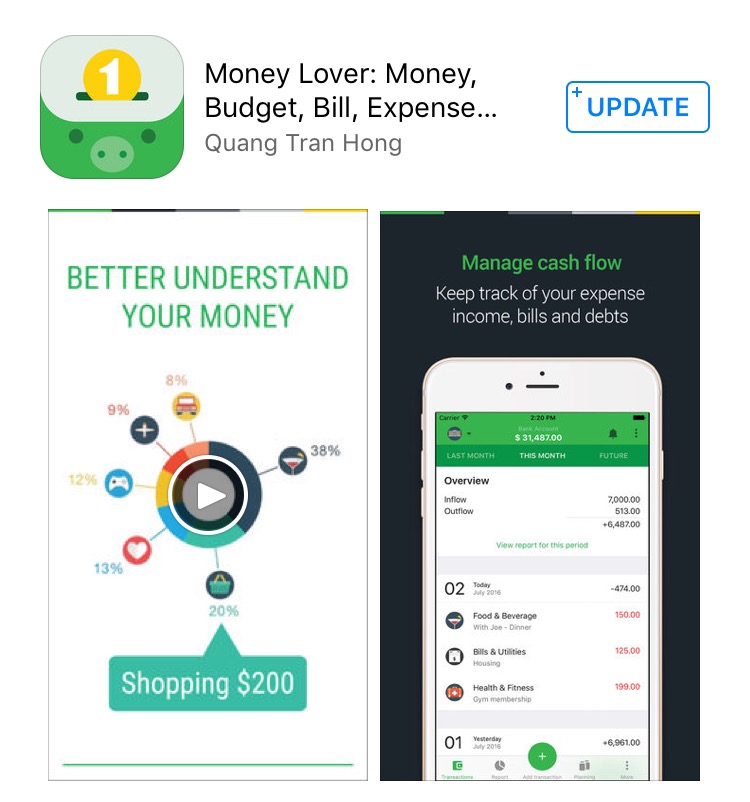
4. Money Lover

Platform : ios / Android
Price : Free with ads / RM 1.49 to RM 95 range in app purchase
Pros : This apps is neat! The appearance is interesting and easy to use. The feature that I like most is this app has a section “Planning” on it. You can plan your savings target, your bills, your debt and also recurring transaction. Other than that, it also have really cool icons of the banks including Malaysia. Of course, you need to pay for that extra features. This is the only apps that support our local back for auto syncing for premium user. Before I forgot, you can view your account on desktop too. Ain’t that cool?
Cons : Well, I don’t really use this app as the layout is kind of confusing to me (only me perhaps?). Other than that, all is good.


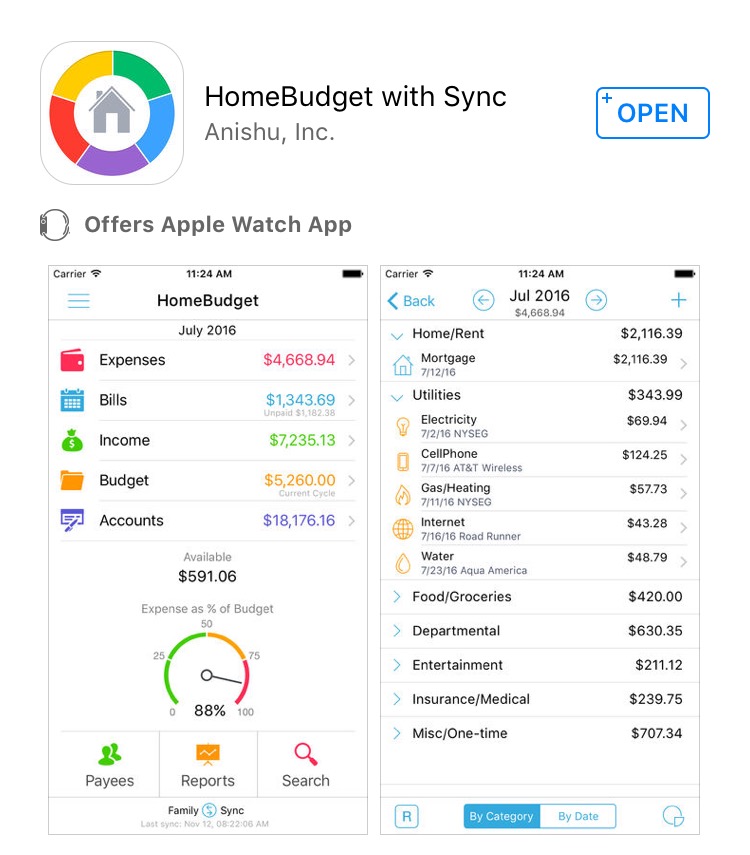
5. Home Budget


Platform : ios / Android
Price : Free for lite version / RM 19.99
Pros : I love this app and I am a premium user. From the name, you can expect that this app is more suitable for household budget. This app support auto syncing between devices that registered to the budget. In my case, if there is any expenses recorded by my wife, it will sync automatically in my phone. This is really useful to keep track on household budget and savings planning. Home Budget also support desktop view for premium. The best thing is it support Apple Watch so I can view my expenses easily
Cons : Hard to keep track on debt repayment, does not allow editing through Apple Watch.

No matter which app that you use to manage your expenses, just remember the golden rule ; follow it. Any other recommended apps? Drop in the comment section.


Jefryzal Talib
Jefryzal Talib

Filed Under: Ekonomi Tagged With: android, apps, financial, ios

  • « Previous Page
  • 1
  • 2
  • 3

Recent Posts

  • Pelajaran Utama Dari Perang Amerika/Israel-Iran
  • Persediaan Menghadapi Krisis Tenaga Kesan Perang Amerika/Israel-Iran
  • Amerika Mulakan Penjajahan Ke Atas Venezuela
  • Tidur Siang Singkat: Kepingan yang Hilang dalam Pendidikan Karakter Kita di Indonesia
  • Aspek Yang Menghubungkan Orang Cina Di Tanah Melayu Dengan Negara China, 1850-2000

Archives

Copyright © 2026 The Independent Insight